
Getting traffic to your website is a good start.
But if people are visiting and you’re still not getting enough sales or leads, getting even more traffic won’t necessarily fix the problem.
You first need to find out what’s stopping people from converting.
It could be the traffic itself. You could be attracting people who aren’t actually interested in buying.
It could also be your landing page, offer, pricing, website experience, or even your tracking.
Before you start changing different parts of your website, try to find out where the problem actually is.
If your website is getting traffic but no sales, start by checking whether the traffic is relevant, which pages people land on, and where they stop moving toward a conversion. If the traffic is qualified, look at your landing page, offer, trust signals, CTA, and anything that could make it harder to buy or get in touch. Also make sure conversions are being tracked correctly before assuming the website isn’t generating results.
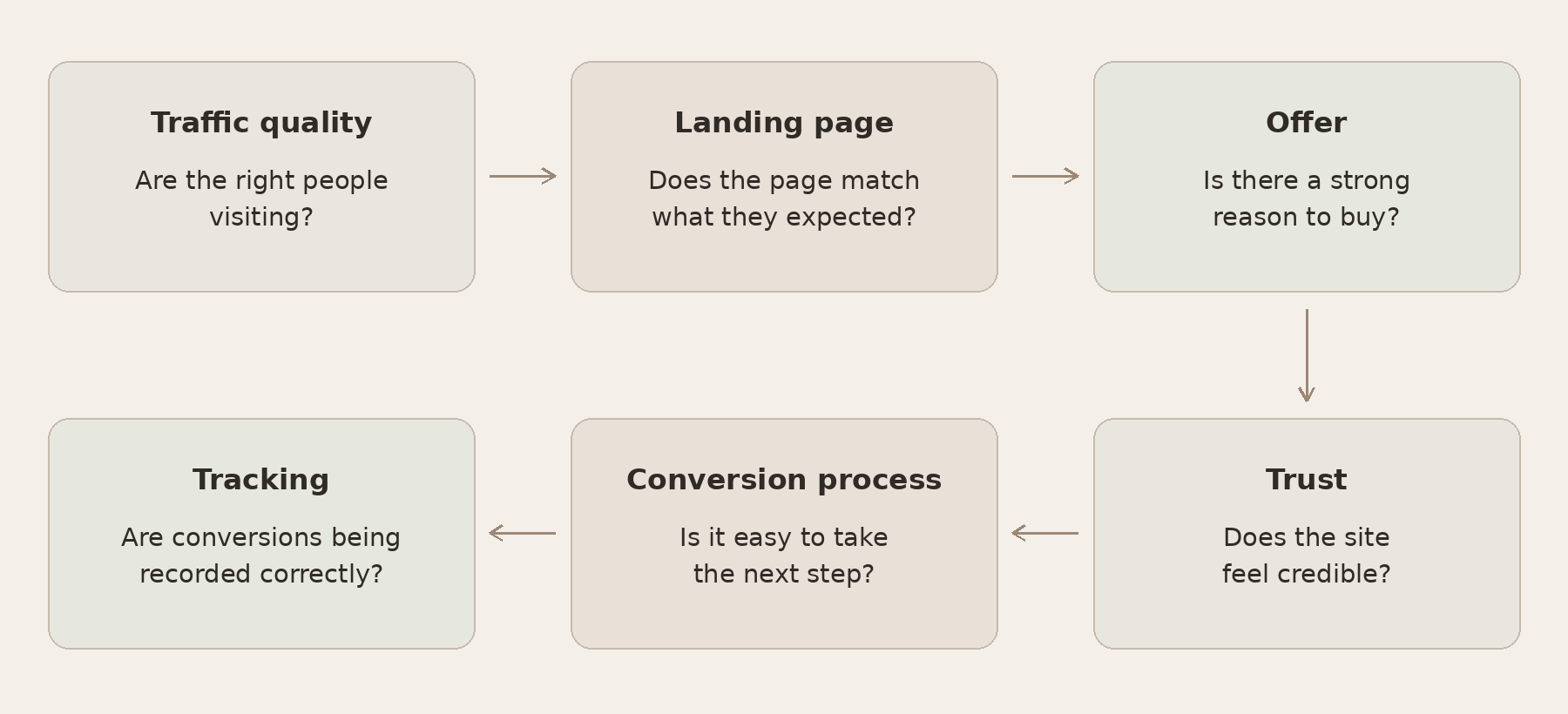
1. Make Sure You’re Getting the Right Traffic
Not all website traffic has the same value.
You could get thousands of visitors every month, but if most of them aren’t potential customers, you can still get very few sales.
This often happens with SEO.
For example, let’s say you sell accounting software.
Someone searching:
what is accounting software
is probably looking for information.
Someone searching:
best accounting software for contractors
could already be comparing different options.
Both people can visit your website, but the second visitor is more likely to become a customer.
Look at where your traffic is coming from. This can include:
- Organic search
- Google Ads
- Social media
- Referral traffic
- Direct traffic
Then look at which pages those visitors are landing on.
If most of your traffic goes to informational blog posts, it doesn’t necessarily mean those visitors will immediately buy something.
For organic traffic, Google Search Console can help you see which searches and pages are bringing people to your website. Its Performance report includes clicks, impressions, click-through rate (CTR), and average position, with breakdowns by queries, pages, countries, devices, and other data.
Also check whether your traffic is coming from the right countries and whether the visitors actually fit your target audience.
Instead of only looking at how much traffic you’re getting, ask:
Are these the right people?
If the answer is no, improving your website alone probably won’t solve the problem.
2. Check Which Pages Get the Most Traffic
Your homepage isn’t always the first page people see.
Visitors can enter through a blog post, product page, service page, landing page, or another part of your website.
This is why it’s important to look at your top landing pages.
For example, you could notice that one blog post brings in a lot of traffic, but your product or service pages barely get any visits.
In this case, the problem might not be that people don’t want your offer.
They simply never reach it.
Look at:
- Which pages bring in the most traffic
- Which pages generate sales or leads
- Which pages get traffic but very few conversions
- Whether blog posts link to relevant product or service pages
If a blog post attracts people who could eventually become customers, give them a natural next step.
For example, you could link to a related service, product, pricing page, case study, or another useful page on your website.
3. Look at What People Do After They Land on Your Website
Once you know you’re attracting relevant traffic, look at what visitors do next.
This can help you see where they’re dropping off.
For an online store, the journey could look like this:
Visit → Product page → Add to cart → Checkout → Purchase
For a service business:
Visit → Service page → Click CTA → Start form → Submit form
For SaaS:
Visit → Product or pricing page → Sign up → Trial → Paid plan
Instead of looking at website traffic as one number, try to see where people stop moving forward.
For example, if people visit your product pages but very few add anything to their cart, take a closer look at the product, pricing, offer, and trust signals.
If many people add products to their cart but don’t complete checkout, the problem is probably happening later.
When looking for the problem, it also helps to compare a longer period instead of relying on a few days of data.
Look at the last 30 to 90 days and break traffic down by things like:
- Channel
- Landing page
- Device
- Location
- New vs returning visitors
For example, you could find that desktop visitors convert well while mobile visitors rarely do.
Or organic traffic could generate leads while social traffic brings visitors who leave without taking action.
This gives you a better idea of where to look next.
| What You’re Seeing | What to Check |
|---|---|
| Lots of traffic but very little engagement | Traffic quality and search intent |
| Blog traffic but few visits to product or service pages | Internal links and next steps |
| Service page visits but very few CTA clicks | Messaging, offer, and CTA |
| Product views but few add-to-carts | Product, pricing, and trust |
| CTA clicks but very few form submissions | Form or technical issues |
| Add-to-carts but few purchases | Checkout, pricing, shipping, and trust |
| Leads or sales exist but analytics shows none | Tracking |
You don’t need to fix everything at once.
First, find out where people are leaving.
4. Make Sure Your Landing Page Matches What People Expected
Sometimes the traffic itself is fine.
The problem is what people see after they click.
For example, imagine someone searches:
SEO consultant for SaaS
They click on a result and land on a page that says:
Helping businesses reach their full potential
This doesn’t tell them whether they actually found what they were looking for.
The page should make it obvious:
- What you offer
- Who it’s for
- What problem it solves
- What someone should do next
The same applies to paid ads.
If your Google Ad promotes one specific service but sends visitors to a general homepage, people can leave because the page doesn’t match what they expected.
Look at your main headline and ask:
Would someone understand what I offer without reading the whole page?
If not, your messaging could be too broad.
5. Check Your Offer
A good-looking website doesn’t automatically mean people will buy.
Sometimes the website is fine, but the offer isn’t strong enough.
Ask why someone should choose your product or service instead of another option.
Look at things like:
- Price
- Features
- Free trial
- Demo
- Guarantee
- Contract length
- Shipping
- Delivery time
- Support
- Cancellation terms
- What’s included
You should also look at what competitors are offering.
This doesn’t mean you need to copy them or lower your prices.
But you should understand what a customer sees when comparing different options.
For example, if a competitor offers transparent pricing, a free trial, customer reviews, and a simple sign-up process while your website only asks people to contact you for more information, they can have an easier time converting the same traffic.
Traffic can bring people to your offer, but it can’t make the offer better on its own.
6. Make Sure People Trust Your Website
People can be interested in what you offer but still hesitate if they don’t trust the business.
This becomes more important when the product or service is expensive.
For example, someone buying a low-cost product can make the decision fairly quickly.
Someone considering a service worth several thousand dollars will usually want more information first.
Depending on your business, trust signals can include:
- Customer reviews
- Testimonials
- Case studies
- Client logos
- Examples of previous work
- Information about the company
- Contact details
- Pricing information
- Secure payment options
- Guarantees
- Return or cancellation policies
Look at your website as if you’ve never heard of the company before.
Would you feel comfortable buying something or sending your contact information?
If not, think about what information is missing.
7. Check If You’re Making It Too Hard to Convert
Sometimes people want to buy or contact you, but the process creates too much friction.
For example:
- Your form has too many fields
- Checkout has too many steps
- Your website loads slowly
- The mobile version is difficult to use
- Your CTA is hard to find
- A button doesn’t work
- Someone has to create an account before continuing
- Important information is difficult to find
- Extra costs appear during checkout
Go through the full process yourself.
Try it on a computer and phone.
Submit the form.
Go through checkout.
Click the main buttons.
See if anything feels confusing or takes longer than it should.
Google’s guidance on page experience recommends checking Core Web Vitals, secure pages, mobile usability, and whether people can easily access the main content without distractions or intrusive pop-ups.
Small issues can easily stop people from converting.
8. Check Your Call to Action
Your CTA should make it obvious what you want someone to do next.
It should also match how ready that person is to buy.
For example, asking someone to Buy Now can make sense for a simple product.
For a more expensive service, someone could need to learn more before they’re ready to make a decision.
Depending on your business, your CTA could be:
- View pricing
- Start a free trial
- Book a demo
- Request a quote
- See examples
- Read a case study
- Send a message
- Learn more
Also make sure the CTA is easy to find.
If someone has to scroll through the entire page before they know what to do next, you can lose people who were already interested.
9. Make Sure Your Tracking Is Working
Before deciding that your website isn’t generating sales, check your tracking.
Sometimes conversions are happening but they aren’t being recorded properly.
For example, someone can visit your website, submit a contact form, and become a lead.
If the form submission isn’t being tracked, your analytics could still show zero conversions.
Google Analytics lets you measure actions such as purchases and sign-ups as events. You can mark the actions that matter most to your business as key events, then check whether they’re being recorded when someone completes them.
Depending on your business, check whether you’re tracking:
- Purchases
- Form submissions
- Calls
- Demo requests
- Bookings
- Trial sign-ups
- Other important actions
Also compare your analytics with other sources.
This can include:
- Your CRM
- Email inbox
- Payment platform
- Booking system
- E-commerce platform
For example, if your CRM shows 15 leads but your analytics shows zero, the problem could be your tracking rather than your website.
10. Don’t Change Everything at Once
Once you notice that traffic isn’t converting, it can be tempting to change the whole website.
That usually makes it harder to understand what was wrong in the first place.
For example, you could change your:
- Headline
- Pricing
- CTA
- Landing page design
- Ads
- Form
- Offer
all at the same time.
If conversions improve, you won’t know which change actually helped.
Instead, find the most likely problem and start there.
For example:
Problem: People visit your service page but very few click the CTA.
Possible reason: The offer isn’t explained well enough.
What to test: Improve the service description and add more proof before the CTA.
Then look at what happens.
This gives you something useful to learn from.
What Should You Check First?
If your website is getting traffic but no sales, start in this order:
1. Check your tracking
Make sure sales and leads are actually being measured.
2. Check your traffic
Make sure you’re attracting people who could realistically become customers.
3. Find where people are dropping off
Look at what they do after they arrive.
4. Check your landing page
Make sure it matches what the visitor expected.
5. Look at your offer
Check whether the value makes sense compared with other options.
6. Check trust and friction
Make sure people feel comfortable taking the next step and that the process is easy.
You don’t need to redesign your whole website before you know what the problem is.
Start with the data you already have.
Should You Get More Traffic?
It depends.
If your website converts well but you simply don’t get enough visitors, increasing traffic can make sense.
But if you already get relevant traffic and very few people convert, work on the conversion problem first.
Otherwise, you can spend more money or time bringing visitors to a website that still isn’t turning them into customers.
Getting people to your website is only part of the process. You also need to make sure they understand your offer, trust the business, and can easily take the next step.
Can a Website Get Good Traffic but Still Have No Sales?
Yes.
Traffic can be relevant without converting if there’s a problem with the landing page, offer, pricing, trust, or conversion process.
This is why traffic numbers alone don’t tell you whether your website is actually helping generate business.
How Do You Know If Traffic Quality Is the Problem?
Look at where visitors come from, which pages they land on, what they searched for, and whether they fit your target customer.
If most visitors are looking for information rather than a product or service, they can increase your traffic without having much effect on sales.
Should You Increase Traffic If Your Website Isn’t Converting?
Not always.
If the website already gets enough relevant visitors but very few become customers, fix the conversion problem first.
Otherwise, you can end up generating or paying for more traffic without fixing the reason people aren’t converting.
Still Need Help?
Don’t have time to figure it out yourself? No problem.
If your website is getting traffic but not enough leads or sales, contact me and we can take a closer look at what’s happening across your SEO, landing pages, and conversion process.
Prefer LinkedIn? Connect with me on LinkedIn.